Showing posts with label Tech Stuff. Show all posts
Sunday, 1 January 2012
Goodbye Safari, Hello FireFox!
I've been using Safari for a couple of years now and I've been reluctant to change as I didn't think that one particular feature that I liked was available in FireFox. What feature I hear you ask, well let me tell you, it's the Top Sites feature.
It's a fairly simple idea, but also very useful - so useful in fact that I put up with the odd website taking ages to load (and sometimes fail to load at all).
One website in particular that it struggles with, is my own website and today I finally got fed up with it and after spending less than two minutes on Google I found a FireFox add-on called Speed Dial...
After installing the latest version of FireFox I went on to the Add-Ons site and searched for Speed Dial, I then clicked on the Add To FireFox button, restarted FireFox and hey presto! Speed Dial was now installed. A few minutes later I had added all of my Top Sites from Safari (just by copying and pasting the URLs).
Then I realised that you can have 'tabs' (known as Groups in the Add-On) so just like you have tabs in your browser, I can now have tabs with all my top sites!
If only I had bothered to spend a couple of minutes searching on Google a year ago...
Tuesday, 29 November 2011
Apple Universal Dock Review

If you have an iPhone or iPod then this could be the perfect accessory for you.
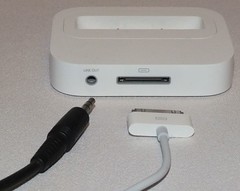
There are 2 reasons that you would want to buy this - the first is that you can use it as a Dock to connect your iPhone or iPod to your computer and the second is that you can use it to connect your iPhone or iPod to your HiFi system.
I personally don't see the point of buying this just to use it as a dock to connect up to your computer as you have a lead that does that and this offers no benefit really when connecting it to your computer.
The benefit of this great bit of kit is that it has a Line Out port at the rear which you can then connect to the Line In/Auxiliary port of your music system and you can use the Remote Control that comes with the Dock to control your iPhone and iPod whilst sitting comfortably in your chair.
The Universal Dock comes with 5 Apple Dock Adaptors that allow you to connect either an iPhone 4, iPhone 3G/3GS, 4th Generation iPod, 2nd/3rd Generation iPod or a 5th Generation iPod nano.
If your Dock Adaptor isn't listed then don't worry, have a look on the Apple Store and see if they have one for your Apple device - the last time I looked they also sold them on the Argos website as well.
Your iPhone/iPod gets charged whilst plugged in to the Dock so so theres no chance of your battery going flat as you listen to music all day long.
Prices start from £35 all the way up to £50+ so it's worth shopping around for the best price of what's in stock if you're interested in this great little gizmo.
Thursday, 27 October 2011
Currently Installing Ubuntu Linux
Wondering if things had changed I thought I'd give it a go again and see how things have evolved. The flavour of Linux I've downloaded is the Ubuntu 10.11 version.
So far it's taken longer to install than XP and actually hung so I've had to re-format and start again. It got stuck installing the languages it had downloaded so I've disconnected it from my network so that won't happen this time!
Ignoring the above glitch, it seems fairly easy to install with none of the messing about you used to have to go through and the range of software out there is increasing by the hour.
I'm looking forward to testing some of the system tools that are available and booting from a USB Flash Drive rather than a Hard Disk Drive or CD/DVD.
Well, the installation says it's now complete and I need to restart - so here goes nothing...
Friday, 1 July 2011
Apple & Microsoft Consortium Buy Patents
My first ever phone was a Nortel phone and the feature that made it stand out from the crowd at the time was the fact that it had voice-activated dialling and it was the only one at the time to have such a thing so I snapped it up!
The fact that no one I knew had a mobile phone was neither here or there! But if they did get one then I could call them by simply pressing one butting and saying their name (along with keeping my fingers crossed it would work) I could make a phone call to them!
Patent wars are becoming more common place these days and are highly sort after pieces of intellectual property. In my opinion the constant legal action taken by one company to another who then in return dig up a patent that the the other company has infringed, or worse still buys a patent from another company that the original company has infringed just so they can counter-sue them is not only daft but is stifling innovation.
So it is very refreshing to see that Apple, Microsoft, RIM, Ericsson, EMC and Sony have joined together in the form of a consortium which paid $4.5bn for around 6,000 patents and patent applications.
The fact that a consortium now owns these patents rather than an individual company can only be a good thing for the industry as a whole as (hopefully) there will be less legal bickering and more innovative and fantastic products for the general public to enjoy!
Wednesday, 29 June 2011
Google's Latest Attempt To Take On Facebook
Once again the mighty Google is taking on Facebook in the world of Social Networking - the failure of its previous attempt (Google Buzz) hasn't stopped the company trying again to completely dominate the internet.
Not satisfied with being (in my opinion) the greatest Search Engine in the world along with having created Google Maps & Google Earth they are still trying to take over the world of Social Networking as well!
What they want you to do is buy a Google Chrome OS laptop, use the Google Chrome web browser to browse to the Google Search engine and use Google Earth and then Google Street View to do what ever you need to do on the web.
They're taking over the Internet!
Is it good or bad that they have all this dominance? I'm still undecided on the matter so will just have to wait and see what happens in the future.
Not satisfied with being (in my opinion) the greatest Search Engine in the world along with having created Google Maps & Google Earth they are still trying to take over the world of Social Networking as well!
What they want you to do is buy a Google Chrome OS laptop, use the Google Chrome web browser to browse to the Google Search engine and use Google Earth and then Google Street View to do what ever you need to do on the web.
They're taking over the Internet!
Is it good or bad that they have all this dominance? I'm still undecided on the matter so will just have to wait and see what happens in the future.
Saturday, 18 June 2011
Read Me Daily by Binatone - eBook Reader Review
If you're looking for a cheap eBook reader then the Binatone Read Me Daily could be right up your street.
Selling at around £69.99 this has got to be one of the cheapest devices on the market right now. With a reading time of around 6-9 hours and an internal memory of 2GB it's suitable for most literature buffs out there!
It has a handy bookmark option so you can continue where you left off and the 7inch TFT display is ample to with the text on and is pretty much the size of a typical novel's page.
You can also play your MP3 files on this handy little device along with MP4 & H.264 videos - don't worry about filling up the internal memory, it has a memory card where you can add up to 32GB more space!
As an eBook reader it works very well with .mobi (Amazon) and .epub (Waterstones) files but if you're looking for something to read PDF files on then this is probably not the device for you as the 7" screen is just too small in my opinion (and this goes for all 7" devices by the way) - you'd be better off with a 10inch Elonex tablet or and iPad/iPad2.
Overall I would give this great little device a score of 7 out of 10 and would recommend it to anyone looking for a great value for money eBook reader.
Selling at around £69.99 this has got to be one of the cheapest devices on the market right now. With a reading time of around 6-9 hours and an internal memory of 2GB it's suitable for most literature buffs out there!
It has a handy bookmark option so you can continue where you left off and the 7inch TFT display is ample to with the text on and is pretty much the size of a typical novel's page.
You can also play your MP3 files on this handy little device along with MP4 & H.264 videos - don't worry about filling up the internal memory, it has a memory card where you can add up to 32GB more space!
As an eBook reader it works very well with .mobi (Amazon) and .epub (Waterstones) files but if you're looking for something to read PDF files on then this is probably not the device for you as the 7" screen is just too small in my opinion (and this goes for all 7" devices by the way) - you'd be better off with a 10inch Elonex tablet or and iPad/iPad2.
Overall I would give this great little device a score of 7 out of 10 and would recommend it to anyone looking for a great value for money eBook reader.
Thursday, 19 May 2011
Mac Malware
Most of us knew this day would come. Mac users have been burying their heads in the sand for far too long now and they have a rude awakening ahead of them as now that Mac's have a 10% share of the American market it's worthwhile criminals writing Malware and that's exactly what they've done!
The Mac Defender fake antivirus virus program can automatically be installed from an infected/dodgy website on to a Mac if you are using the Safari web browser if the Open "safe" files option is enabled.Apple sent a memo to their technical staff that said "AppleCare does not provide support for removal of the Malware. You should not confirm or deny whether the customer's Mac is infected or not".
Basically they're saying it's your fault you got Malware so you sort it out - we didn't put it there so we're not helping you!
They're assuming that the Malware has prompted the user to enter their Administrator password and that if you've entered the password then you have effectively agreed to have the Malware on your Mac, but many users that have been infected have denied that this is the case.
Apple need to get their act together very quickly else they'll have a major problem on their hands - remember, the bigger the are, the harder they fall so if Macs end up having the same Malware/Adware/Virus issues as normal computers (PC's) then why bother buying a Mac?
Sunday, 23 January 2011
Apple Magic Trackpad
A few months ago I started getting quite a bit of pain in some of my fingers in my right hand and had the odd shooting pain coming from my fingers and after a visit to the Doctors it turns out I have RSI from all the mouse clicking I do at work.
I began looking for a mouse alternative and then I came across the Apple Magic Trackpad. I've had it for a while now and I have to say it's a lot better than I thought it would be.
Although I have a laptop that already has one of these things built in, I have a 22" monitor connected to it and have my laptop on a stand so both screens are at roughly the same sort of height - therefore I use a USB keyboard etc.
Using the Apple Magic Trackpad at home has reduced the amount of pain I now get in my fingers as with the trackpad you can use any finger you like to tap/click and drag/drop and have your hand/fingers in any position that is the most comfortable for you.
In fact, you can use multiple fingers (up to 4) all at the same time to do everything from a right-click to showing you all the programs you have running!
Despite it's expense this was one of my best purchases for my computer as it's helped me with my RSI pain.
If I didn't have RSI, would I use this or a mouse? I'd have to say mouse for the simple reason I've been using one for years and can move a mouse so much faster than I can use one of these trackpad things - I guess I'll get quicker with time.
I began looking for a mouse alternative and then I came across the Apple Magic Trackpad. I've had it for a while now and I have to say it's a lot better than I thought it would be.
Although I have a laptop that already has one of these things built in, I have a 22" monitor connected to it and have my laptop on a stand so both screens are at roughly the same sort of height - therefore I use a USB keyboard etc.
Using the Apple Magic Trackpad at home has reduced the amount of pain I now get in my fingers as with the trackpad you can use any finger you like to tap/click and drag/drop and have your hand/fingers in any position that is the most comfortable for you.
In fact, you can use multiple fingers (up to 4) all at the same time to do everything from a right-click to showing you all the programs you have running!
Despite it's expense this was one of my best purchases for my computer as it's helped me with my RSI pain.
If I didn't have RSI, would I use this or a mouse? I'd have to say mouse for the simple reason I've been using one for years and can move a mouse so much faster than I can use one of these trackpad things - I guess I'll get quicker with time.
Thursday, 30 December 2010
The Conduit - First Person Shoot 'em Up On The Nintendo Wii
Right on the front of the box is a quote from IGN claiming that this is "the best shooting game on the Wii" so I had no choice but to buy it and give it a go! Two and a half hours later and I was still playing it so I guess they could be right!
I've played games such as Call of Duty on the Wii (I still own one of them) but to be honest, for me their too realistic as the wars they are set in are still in 'recent' history so I find them a little bit disrespectful/distasteful and that puts me off playing them.
The Conduit reminds of the good old days before such COD type games existed and you have missions to go on that involve blowing the brains out of aliens and such like as you progress through the many different levels - a 'Doom Style' game (as I call them) and it's absolutely fantastic! The graphics and gameplay are brilliant and there's plenty of different weapons to get to grips with, but be careful if you have an itch as when I scratched my head with my hand that had the nun-chuck in a inadvertently threw a grenade and blew myself up!
Wii Mans Game Rating
Fun Factor: 8/10 – First person shoot 'em ups don't come much finer than this!
Playability: 9/10 – Wii Controller & Nun-chuck required - don't scratch you head else you might throw a grenade though...
Gameplay: 8/10 – The first time I put in the disk I spent hours playing this game so it must be good!
Graphics: 6/10 – The graphics are just as good as any other Wii game out there with nothing outstanding to give it a higher rating
Sound/Music: 8/10 – Atmospheric sound(s) in this game increase the overall gaming experience and help make this game fantastic!
All-in-all a great game, but there's still something missing that I cant quite put my finger on as yet that would make this game so much better.
Overall 39/50

Sunday, 5 December 2010
Apple iPhone 4 on Vodafone
I am now the proud new owner of Apple's iPhone 4 and I have to say it's the best gadget I have ever brought! Not sure how it rates as a phone as make/recieving phone calls is a bit redundant for a lot of people these days as text messages and social networking on Twitter and Facebook are becoming more commonplace.
A lot of people who get an iPhone or iPad moan about having to use iTunes to copy files to their device but once you get used to it, it's actually a very good idea as it's actually quite a simple program to use and takes the pain out of having to manually delete things from your device to make room for other things you want to put on it - a simple tick in a box means it gets copied across and an un-ticking of a box means it gets removed.One of the best features of the iPhone (and iPad I suppose) is the App Store where you can get games, utilities and all sorts of other programs to either keep you occupied or help you through the day. There are thousands of free Apps so it's not necessarily going to cost you an arm and a leg to get any Apps on your device but it wont be long before you're tempted to purchase the odd one or two at 59p each - just remember they soon add up to quite a lot so be careful you don't get trigger happy and buy too many!
After wandering around my local High Street and shopping centre comparing prices, I found all but one to be pretty much the same prices. The one that differed in price was Phones4U where they were £70 cheaper on the handset on an 18month contract on the Vodafone network than the Vodafone shop itself!
I dont get a particularly brilliant Vodafone signal where I live (I knew this before I purchased the phone) I get a good phone signal but only get an Edge connection for internet browsing etc. but as I have WiFi I wasn't concerned about that. I went with Vodafone for the simple reason that the handset price on the package I was after was significantly cheaper than all the other networks.
Sunday, 24 October 2010
iLife '11 - First Impressions
I've just installed iLife '11 on my MacBook and my first impressions are that it doesn't seem to be a great deal different to the '09 version that I previously had installed.
Apple have updated iPhoto, iMovie and GarageBand. I don't use GarageBand so I can't really comment on that one. After opening up iPhoto I was prompted to update my photo database which (as I have thousands of photos) took quite a while. iPhoto looks pretty much how it used to and from what I can see doesn't really have any new features, all they seem to have done is improve the interface to make using iPhoto a little bit easier.
Is it worth upgrading to iLife '11 or should you stick with iLife '09? I'll see how I get on with it over the next few weeks/months and let you know.
Apple have updated iPhoto, iMovie and GarageBand. I don't use GarageBand so I can't really comment on that one. After opening up iPhoto I was prompted to update my photo database which (as I have thousands of photos) took quite a while. iPhoto looks pretty much how it used to and from what I can see doesn't really have any new features, all they seem to have done is improve the interface to make using iPhoto a little bit easier.
Is it worth upgrading to iLife '11 or should you stick with iLife '09? I'll see how I get on with it over the next few weeks/months and let you know.
Saturday, 12 June 2010
Safari Version 5
I'm currently downloading the latest version of Apples Safari (Version 5) which claims to be even faster than before - in fact it says it's the fastest most innovative web browser out there!
They've addded something called 'Safari Reader' which basically strips out all the adverts on a website so you can just read the article - that's bound to have an effect on websites who can only exist due to advertising revenue, no adverts shown then there's nothing to click on so websites go under :( also they seem to have done a deal with Microsoft as Bing search is now integrated in to it.
Is it any faster than before? I'll find out once I've rebooted my laptop!
More details from Apple directly here: http://www.apple.com/uk/safari/
They've addded something called 'Safari Reader' which basically strips out all the adverts on a website so you can just read the article - that's bound to have an effect on websites who can only exist due to advertising revenue, no adverts shown then there's nothing to click on so websites go under :( also they seem to have done a deal with Microsoft as Bing search is now integrated in to it.
Is it any faster than before? I'll find out once I've rebooted my laptop!
More details from Apple directly here: http://www.apple.com/uk/safari/
Thursday, 14 January 2010
BookArc - Vertical MacBook Laptop Stand
Oh my god, I can't believe I've just spent £34.99 on a small piece of metal!
About a week ago I was trying to work out how I could make a bit more space on my desk so I started looking for a solution via the Google search engine. I came across loads of normal laptop stands, some plastic, some metal and some with built-in fans to help keep your laptop cool - but none that would help me free up some space. :(
Then I came across a company called Twelve South who produced a vertical laptop stand specifically for MacBooks - hooray! I had a quick look on the shop on Apple's web site and when I saw the price I quickly closed my web browser in shock! £39.99 + delivery costs!!!
I refused to believe that it would cost so much so I had a good search around and the best price I found was on Amazon.co.uk where after much debate with my wallet, I finally ordered the stand at a cost of £34.99 + 4.50 delivery.
After placing the order 3 days ago (despite all the snow we are currently experiencing here in the UK) it landed on my doormat this afternoon! :)
Straight away I could see that a lot of effort has been put in to this premium product as the packaging looked very 'Mac-ish'. After removing the sleeve and opening the box you are greeted with a thank you message.
The BookArc comes with 3 differently sized pieces of rubber which you can fit to the BookArc depending on what model of MacBook you have. I have to say though, it's not as snug as I expected and I'm not sure this is a design issue or if it's meant to be like that.
My MacBook is now working in Clam-Shell mode and is sitting to the left hand side of my monitor and has freed up a fair bit of room.
So is the BookArc worth spending around £40 on? Not really, but are there any other vertical laptop stands? Not that I could find, so if you want a vertical laptop stand then it's the BookArc or nothing.
In conclusion, if you're looking for a vertical laptop stand then there is one available, but it comes at a price.
About a week ago I was trying to work out how I could make a bit more space on my desk so I started looking for a solution via the Google search engine. I came across loads of normal laptop stands, some plastic, some metal and some with built-in fans to help keep your laptop cool - but none that would help me free up some space. :(
Then I came across a company called Twelve South who produced a vertical laptop stand specifically for MacBooks - hooray! I had a quick look on the shop on Apple's web site and when I saw the price I quickly closed my web browser in shock! £39.99 + delivery costs!!!
I refused to believe that it would cost so much so I had a good search around and the best price I found was on Amazon.co.uk where after much debate with my wallet, I finally ordered the stand at a cost of £34.99 + 4.50 delivery.
After placing the order 3 days ago (despite all the snow we are currently experiencing here in the UK) it landed on my doormat this afternoon! :)
Straight away I could see that a lot of effort has been put in to this premium product as the packaging looked very 'Mac-ish'. After removing the sleeve and opening the box you are greeted with a thank you message.
The BookArc comes with 3 differently sized pieces of rubber which you can fit to the BookArc depending on what model of MacBook you have. I have to say though, it's not as snug as I expected and I'm not sure this is a design issue or if it's meant to be like that.
My MacBook is now working in Clam-Shell mode and is sitting to the left hand side of my monitor and has freed up a fair bit of room.
So is the BookArc worth spending around £40 on? Not really, but are there any other vertical laptop stands? Not that I could find, so if you want a vertical laptop stand then it's the BookArc or nothing.
In conclusion, if you're looking for a vertical laptop stand then there is one available, but it comes at a price.
Tuesday, 29 December 2009
Asus EEE 1000H
The Asus Eee 1000H is a fantastic bit of kit and I can see why the Asus Eee sub-notebook PCs have been getting rave reviews all over the place!
Small, compact, lighter than a full-size notebook/laptop but large enough to do the job. The Eee 1000H comes with a 10" display which is more manageable than the 8.9" or less that the other Eee models have. The keyboard is easy to use as it is about 95% of the size of a standard laptops keyboard. With a battery life of upto 8 hours it is a fantastic buy!
The processor is a 1.6GHz Intel Atom which is designed specifically for netbooks (as they are now being called) and with 1GB of RAM and an 80GB hard disk drive, the machine is definately up to the job of running most business type of applications.
You can upgrade the RAM to a maximum of 2GB which is ample for this type of computer, remember it's not laptop, it's a netbook that is designed to be used to go on the Internet. Having said that, it is more than capable of running applications such as Microsoft Word albeit slightly slower than a normal laptop. As it doesn't come with a CD or DVD drive you will need an external CD drive to install any software you have on CD/DVD. I have noticed that certain antivirus companies are selling their software on USB sticks specifically for NetBook owners.
One negative thing I have to say about the unit is that the cooling fan is a lot noisier than you might expect, it may not be any louder than that found on a full-sized laptop but on something as small as this it is quite noticeable in a quiet room.
Google Chrome OS
With Google's free Chrome OS being released in 2010, NetBooks are set to become a hell of a lot faster as Microsoft Windows is a bit of an overkill if all you want to do is surf the web.
:)
Small, compact, lighter than a full-size notebook/laptop but large enough to do the job. The Eee 1000H comes with a 10" display which is more manageable than the 8.9" or less that the other Eee models have. The keyboard is easy to use as it is about 95% of the size of a standard laptops keyboard. With a battery life of upto 8 hours it is a fantastic buy!
The processor is a 1.6GHz Intel Atom which is designed specifically for netbooks (as they are now being called) and with 1GB of RAM and an 80GB hard disk drive, the machine is definately up to the job of running most business type of applications.
You can upgrade the RAM to a maximum of 2GB which is ample for this type of computer, remember it's not laptop, it's a netbook that is designed to be used to go on the Internet. Having said that, it is more than capable of running applications such as Microsoft Word albeit slightly slower than a normal laptop. As it doesn't come with a CD or DVD drive you will need an external CD drive to install any software you have on CD/DVD. I have noticed that certain antivirus companies are selling their software on USB sticks specifically for NetBook owners.
One negative thing I have to say about the unit is that the cooling fan is a lot noisier than you might expect, it may not be any louder than that found on a full-sized laptop but on something as small as this it is quite noticeable in a quiet room.
Google Chrome OS
With Google's free Chrome OS being released in 2010, NetBooks are set to become a hell of a lot faster as Microsoft Windows is a bit of an overkill if all you want to do is surf the web.
:)
Monday, 28 December 2009
3G Card Reviews
Networks Under Review: BT Mobile Broadband, Vodafone Mobile Broadband and 3 Mobile Broadband
Vodafone Mobile Broadband
I tested the Vodafone mobile broadband over a 48hr period and with them advertising all over the place that they are the fastest mobile broadband provider with a maximum speed of 7.2Mbps I had high expectations.
My experience was unfortunately less than satisfactory.
Throughout the 48hr period I could not get a connection faster than .01Mbps so it was most definately not a fast internet connection, I would have been better off using and old fasioned dialup modem.
I did try emailing their technical support to see if there was anything wrong with the access points but I didnt get a reply until 7 days later when I had already returned the product to the shop I got it from and cancelled within the 14 day period.
They then had the cheek to charge me around £5 for trying to use it!
Score: 5/10 - Every time I tried to connect I could but the very poor connection speed let it down.
BT Mobile Broadband
At work we use various different mobile broadband solutions, one of which is BT Broadband.
I had to work from home over the last couple of days so I borrowed one to see how I got on with it.
Promising speeds up to 3.6Mbps I was pleasantly surprised to see that I got a 512Mbps connection speed. However this wasnt constant and kept dropping down to 53Kbps - slower than a dialup modems speed.
When it did disconnect me I had to constantly fiddle to get it to connect again, the software was telling me to check the SIM, remove the modem, plug it back in again, stand on my head, pull a funny face and then reboot.
Rebooting seemed to do the trick but I never had this problem with Vodafone, it may have been a poor connection speed but it was at least constant and stable.
Score: 4/10 - it may be faster (at times) than the Vodafone offering but the messing about to get it working when it kept on disconnecting itself lets it down tremendously.
3 Mobile Broadband
Vodafone may be the largest mobile phone company, but did you know that 3 have the largest mobile broadband coverage at 80%? 80% may not sound much, but Vodafone and BT Mobile Broadband dont have a mobile broadband coverage that high.
The 3 mobile broadband offering states speeds of up to 3.6Mbps but they then say only to expect up to a 1Mbps speed unless you are in a large City such as London. Now there's honesty we dont see from other providers!
The speed I get from 3's mobile broadband network is a constant 512Mbps. It didnt disconnect from me at all but just to test it, I disconnected it manually a few times and was able to reconnect withing a minute without any messing about!
I tried contacting 3's techincal support and they were about as much use as the Vodafone response as they also took around 7 days to reply. So much for email being quicker than Royal Mail!!!
Score: 8/10 - With a constant fast-ish speed that never let me down this has got to be the mobile broadband of choice. Only the long delay from emailing technical support lets this offering down.
Vodafone Mobile Broadband
I tested the Vodafone mobile broadband over a 48hr period and with them advertising all over the place that they are the fastest mobile broadband provider with a maximum speed of 7.2Mbps I had high expectations.
My experience was unfortunately less than satisfactory.
Throughout the 48hr period I could not get a connection faster than .01Mbps so it was most definately not a fast internet connection, I would have been better off using and old fasioned dialup modem.
I did try emailing their technical support to see if there was anything wrong with the access points but I didnt get a reply until 7 days later when I had already returned the product to the shop I got it from and cancelled within the 14 day period.
They then had the cheek to charge me around £5 for trying to use it!
Score: 5/10 - Every time I tried to connect I could but the very poor connection speed let it down.
BT Mobile Broadband
At work we use various different mobile broadband solutions, one of which is BT Broadband.
I had to work from home over the last couple of days so I borrowed one to see how I got on with it.
Promising speeds up to 3.6Mbps I was pleasantly surprised to see that I got a 512Mbps connection speed. However this wasnt constant and kept dropping down to 53Kbps - slower than a dialup modems speed.
When it did disconnect me I had to constantly fiddle to get it to connect again, the software was telling me to check the SIM, remove the modem, plug it back in again, stand on my head, pull a funny face and then reboot.
Rebooting seemed to do the trick but I never had this problem with Vodafone, it may have been a poor connection speed but it was at least constant and stable.
Score: 4/10 - it may be faster (at times) than the Vodafone offering but the messing about to get it working when it kept on disconnecting itself lets it down tremendously.
3 Mobile Broadband
Vodafone may be the largest mobile phone company, but did you know that 3 have the largest mobile broadband coverage at 80%? 80% may not sound much, but Vodafone and BT Mobile Broadband dont have a mobile broadband coverage that high.
The 3 mobile broadband offering states speeds of up to 3.6Mbps but they then say only to expect up to a 1Mbps speed unless you are in a large City such as London. Now there's honesty we dont see from other providers!
The speed I get from 3's mobile broadband network is a constant 512Mbps. It didnt disconnect from me at all but just to test it, I disconnected it manually a few times and was able to reconnect withing a minute without any messing about!
I tried contacting 3's techincal support and they were about as much use as the Vodafone response as they also took around 7 days to reply. So much for email being quicker than Royal Mail!!!
Score: 8/10 - With a constant fast-ish speed that never let me down this has got to be the mobile broadband of choice. Only the long delay from emailing technical support lets this offering down.
Sunday, 27 December 2009
If People Brought Cars Like Computers...
Call No. 1
HELPLINE: "General Motors Helpline, how can I help you?"
CUSTOMER: "I got in my car and closed the door, and nothing happened!"
HELPLINE: "Did you put the key in the ignition slot and turn it?"
CUSTOMER: "What's an ignition?"
HELPLINE: "It's a starter motor that draws current from your battery and turns over the engine."
CUSTOMER: "Ignition? Motor? Battery? Engine? How come I have to know all of these technical terms just to use my car?"
Call No. 2
HELPLINE: "General Motors Helpline, how can I help you?"
CUSTOMER: "My car ran fine for a week, and now it won't go anywhere!"
HELPLINE: "Is the gas tank empty?"
CUSTOMER: "Huh? How do I know?"
HELPLINE: "There's a little guage on the front panel, with a needle, and markings from 'E' to 'F.' Where is the needle pointing?"
CUSTOMER: "It's pointing to 'E.' What does that mean?"
HELPLINE: "It means that you have to visit a gasoline vendor, and purchase some more gasoline. You can install it yourself, or pay the vendor to install it for you."
CUSTOMER: "What!? I paid $$12,000 for this car! Now you tell me that I have to keep buying more components? I want a car that comes with everything built in!"
Call No. 3
HELPLINE: "General Motors Helpline, how can I help you?"
CUSTOMER: "Your car sucks!"
HELPLINE: "What's wrong?"
CUSTOMER: "It crashed, that's what went wrong!"
HELPLINE: "What were you doing?"
CUSTOMER: "I wanted to run faster, so I pushed the accelerator pedal all the way to the floor. It worked for a while, and then it crashed -- and now it won't start!"
HELPLINE: "It's your responsibility if you misuse the product. What do you expect us to do about it?"
CUSTOMER: "I want you to send me one of the latest versions that doesn't crash anymore!"
Call No. 4
HELPLINE: "General Motors Helpline, how can I help you?"
CUSTOMER: "Hi! I just bought my first car, and I chose your car because it has automatic transmission, cruise control, power steering, power brakes, and power door locks."
HELPLINE: "Thanks for buying our car. How can I help you?"
CUSTOMER: "How do I work it?"
HELPLINE: "Do you know how to drive?"
CUSTOMER: "Do I know how to what?"
HELPLINE: "Do you know how to drive?"
CUSTOMER: "I'm not a technical person! I just want to go places in my car!"
Ask any support tech: they'll tell you these are not exaggerations!
HELPLINE: "General Motors Helpline, how can I help you?"
CUSTOMER: "I got in my car and closed the door, and nothing happened!"
HELPLINE: "Did you put the key in the ignition slot and turn it?"
CUSTOMER: "What's an ignition?"
HELPLINE: "It's a starter motor that draws current from your battery and turns over the engine."
CUSTOMER: "Ignition? Motor? Battery? Engine? How come I have to know all of these technical terms just to use my car?"
Call No. 2
HELPLINE: "General Motors Helpline, how can I help you?"
CUSTOMER: "My car ran fine for a week, and now it won't go anywhere!"
HELPLINE: "Is the gas tank empty?"
CUSTOMER: "Huh? How do I know?"
HELPLINE: "There's a little guage on the front panel, with a needle, and markings from 'E' to 'F.' Where is the needle pointing?"
CUSTOMER: "It's pointing to 'E.' What does that mean?"
HELPLINE: "It means that you have to visit a gasoline vendor, and purchase some more gasoline. You can install it yourself, or pay the vendor to install it for you."
CUSTOMER: "What!? I paid $$12,000 for this car! Now you tell me that I have to keep buying more components? I want a car that comes with everything built in!"
Call No. 3
HELPLINE: "General Motors Helpline, how can I help you?"
CUSTOMER: "Your car sucks!"
HELPLINE: "What's wrong?"
CUSTOMER: "It crashed, that's what went wrong!"
HELPLINE: "What were you doing?"
CUSTOMER: "I wanted to run faster, so I pushed the accelerator pedal all the way to the floor. It worked for a while, and then it crashed -- and now it won't start!"
HELPLINE: "It's your responsibility if you misuse the product. What do you expect us to do about it?"
CUSTOMER: "I want you to send me one of the latest versions that doesn't crash anymore!"
Call No. 4
HELPLINE: "General Motors Helpline, how can I help you?"
CUSTOMER: "Hi! I just bought my first car, and I chose your car because it has automatic transmission, cruise control, power steering, power brakes, and power door locks."
HELPLINE: "Thanks for buying our car. How can I help you?"
CUSTOMER: "How do I work it?"
HELPLINE: "Do you know how to drive?"
CUSTOMER: "Do I know how to what?"
HELPLINE: "Do you know how to drive?"
CUSTOMER: "I'm not a technical person! I just want to go places in my car!"
Ask any support tech: they'll tell you these are not exaggerations!
Sunday, 6 September 2009
Apple Mac & PC Differences
So, What Is The Difference Between A PC & A Mac Then?
After using OS X on my MacBook for over a week now I have noticed that it is significantly faster than a similar spec’d Windows laptop.
My MacBook is also a lot quieter than any PC laptop I have ever used. I assumed that this was due to the hardware, but after playing around with Boot Camp (this allows you to dual boot your Mac computer with Windows), I noticed that my laptop became noisy when Windows XP was installed.
Windows always seems to be up to something so you constantly hear either the CPU fan spinning up and down or the hard disk drive ticking away. I have Windows Vista Ultimate Edition on my Dell desktop computer and one of the first things I did was to turn the indexing off, as the constant clicking of the hard disk drive was so annoying. I foolishly thought this was due to the hardware, but my experience with my new Mac has taught me that this is not necessarily the case.
So why is XP/Vista so noisy? God knows, you could argue that it’s because it’s indexing everything on the hard drive to make finding things quicker – Mac OS X does this and I’ve never heard such a quiet laptop for a long while!
The out-of-the-box experience is better than most Windows based computers as pretty much everything I could ever need was there waiting for me to start using it! I can play DVD’s, edit/create movies and even organize my photos using a fantastic application called iPhoto (what a great piece of software) and even automatically backup my whole computer using Time Machine without spending another penny.
The only software I did purchase was Microsoft Office 2008 for Mac and the only reason I did this is because whether we like it or not, Microsoft Office is the most likely office suite to find installed on a computer in the business world and it’s this world that I work in.
The time it takes to power up my MacBook and let the Operating System finish loading is about the same time as the PC laptops I am used the using.
However, once OS X has loaded you can start using it. On a Windows computer you can’t as it has to load things like anti-spyware and anti-virus as well as umpteen different programs that sit on the taskbar and it’s these programs that mean you have to wait longer on a PC to start using it than on a Mac.
Even copying data to and from a USB hard drive seems quicker on a Mac! OS X just seems to use the hardware better than Operating Systems like Windows XP and Vista (although I must say Vista is quicker at this than XP is).
So in a nutshell, I have to say that there is a significant difference between Windows and that of the Mac OS – without a doubt in my mind, the Mac OS is far, far better and with the new updated ‘Snow Leopard’ version of OS X promising even faster performance on a Mac, I can’t wait for the disk to land on my doormat!
After using OS X on my MacBook for over a week now I have noticed that it is significantly faster than a similar spec’d Windows laptop.
My MacBook is also a lot quieter than any PC laptop I have ever used. I assumed that this was due to the hardware, but after playing around with Boot Camp (this allows you to dual boot your Mac computer with Windows), I noticed that my laptop became noisy when Windows XP was installed.
Windows always seems to be up to something so you constantly hear either the CPU fan spinning up and down or the hard disk drive ticking away. I have Windows Vista Ultimate Edition on my Dell desktop computer and one of the first things I did was to turn the indexing off, as the constant clicking of the hard disk drive was so annoying. I foolishly thought this was due to the hardware, but my experience with my new Mac has taught me that this is not necessarily the case.
So why is XP/Vista so noisy? God knows, you could argue that it’s because it’s indexing everything on the hard drive to make finding things quicker – Mac OS X does this and I’ve never heard such a quiet laptop for a long while!
The out-of-the-box experience is better than most Windows based computers as pretty much everything I could ever need was there waiting for me to start using it! I can play DVD’s, edit/create movies and even organize my photos using a fantastic application called iPhoto (what a great piece of software) and even automatically backup my whole computer using Time Machine without spending another penny.
The only software I did purchase was Microsoft Office 2008 for Mac and the only reason I did this is because whether we like it or not, Microsoft Office is the most likely office suite to find installed on a computer in the business world and it’s this world that I work in.
The time it takes to power up my MacBook and let the Operating System finish loading is about the same time as the PC laptops I am used the using.
However, once OS X has loaded you can start using it. On a Windows computer you can’t as it has to load things like anti-spyware and anti-virus as well as umpteen different programs that sit on the taskbar and it’s these programs that mean you have to wait longer on a PC to start using it than on a Mac.
Even copying data to and from a USB hard drive seems quicker on a Mac! OS X just seems to use the hardware better than Operating Systems like Windows XP and Vista (although I must say Vista is quicker at this than XP is).
So in a nutshell, I have to say that there is a significant difference between Windows and that of the Mac OS – without a doubt in my mind, the Mac OS is far, far better and with the new updated ‘Snow Leopard’ version of OS X promising even faster performance on a Mac, I can’t wait for the disk to land on my doormat!
Sunday, 28 September 2008
Subscribe to:
Posts (Atom)