Showing posts with label Apple. Show all posts

Saturday, 2 June 2012

Just Spilt A Fizzy Drink On My Apple Aluminium Keyboard

I've just spilt a pint of Diet Pepsi all over my keyboard :( I mopped it up very quickly but it was completely drenched and it narrowly missed my iPhone by a matter of millimeters!

I've rinsed the keyboard under cold water for a few minutes (if the Pepsi dries it will make all the keys very, very sticky so rinsing it away should hopefully stop my keyboard from being sticky).

I then drained as much water from the keyboard as I could and wrapped it in newspaper and placed in the airing cupboard under the stairs where it can dry out over the next few days.

Luckily I have my laptop on a stand so only the USB keyboard (and a few bits of paper) got wet.

I'll leave it in the airing cupboard for a few days where hopefully the newspaper and the gentle warmth will draw the water out and leave my keyboard nice and dry, and hopefully not sticky.

Will it work when I plug it back in - I guess we'll find out in a few days time...


EDIT: After two and a bit days wrapped in newspaper in the airing cupboard I finally thought it was long enough for all the moisture to have dried out so I have just unwrapped the keyboard and plugged it in to my MacBook and guess what?

Did you guess that it would or wouldn't work?  Well let me tell you, it's kinda both as part of it works and part of it doesn't work properly - if I press the 'i' or 'o' key it produces both characters no matter which one I press and the same goes for the K and L keys.

New keyboard it will have to be then :(


EDIT 2: HOORAY!!  I've just tried my keyboard once more before throwing out of the window and you'll never guess what? Yes! All the keys now work!  I guess I didn't leave it long enough to dry.

So, in a nutshell if you spill anything other than plain water on your Apple Aluminium Keyboard, unplug it from your Mac straight away, rinse it thoroughly in cold water to wash away any stick/smelly liquids and then leave it to dry for a week - wrapping it in newspaper will help draw out the water or putting it in a large bag of rice might also do the trick (rice soaks up water and is frequently used when people drop their mobile phones in water).

:)


Sunday, 1 January 2012

Goodbye Safari, Hello FireFox!


I've been using Safari for a couple of years now and I've been reluctant to change as I didn't think that one particular feature that I liked was available in FireFox.  What feature I hear you ask, well let me tell you, it's the Top Sites feature.

Safari Top Sites Example
 
It's a fairly simple idea, but also very useful - so useful in fact that I put up with the odd website taking ages to load (and sometimes fail to load at all).

One website in particular that it struggles with, is my own website and today I finally got fed up with it and after spending less than two minutes on Google I found a FireFox add-on called Speed Dial...

After installing the latest version of FireFox I went on to the Add-Ons site and searched for Speed Dial, I then clicked on the Add To FireFox button, restarted FireFox and hey presto!  Speed Dial was now installed.  A few minutes later I had added all of my Top Sites from Safari (just by copying and pasting the URLs).

Then I realised that you can have 'tabs' (known as Groups in the Add-On) so just like you have tabs in your browser, I can now have tabs with all my top sites!

Speed Dial FireFox Add-On Example


If only I had bothered to spend a couple of minutes searching on Google a year ago...

Tuesday, 29 November 2011

Apple Universal Dock Review


If you have an iPhone or iPod then this could be the perfect accessory for you.

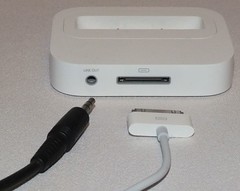
There are 2 reasons that you would want to buy this - the first is that you can use it as a Dock to connect your iPhone or iPod to your computer and the second is that you can use it to connect your iPhone or iPod to your HiFi system.

I personally don't see the point of buying this just to use it as a dock to connect up to your computer as you have a lead that does that and this offers no benefit really when connecting it to your computer.

Apple Universal Dock
The benefit of this great bit of kit is that it has a Line Out port at the rear which you can then connect to the Line In/Auxiliary port of your music system and you can use the Remote Control that comes with the Dock to control your iPhone and iPod whilst sitting comfortably in your chair.

The Universal Dock comes with 5 Apple Dock Adaptors that allow you to connect either an iPhone 4, iPhone 3G/3GS, 4th Generation iPod, 2nd/3rd Generation iPod or a 5th Generation iPod nano.

If your Dock Adaptor isn't listed then don't worry, have a look on the Apple Store and see if they have one for your Apple device - the last time I looked they also sold them on the Argos website as well.

Your iPhone/iPod gets charged whilst plugged in to the Dock so so theres no chance of your battery going flat as you listen to music all day long.

Prices start from £35 all the way up to £50+ so it's worth shopping around for the best price of what's in stock if you're interested in this great little gizmo.

Saturday, 9 July 2011

Secret Agents Raid Apple Artists Home


Yes, you read that right!

USA Secret Agents have raided an 'artists' home after they found out that they had installed software on the laptops in their local Apple store that every 60 seconds took a photo using the built-in webcam and if the software detected a face it was uploaded on to the internet!

The 'artist' thought it was OK to do this as they had sought the permission from a security guard...

Friday, 1 July 2011

Apple & Microsoft Consortium Buy Patents

logo-nortel

My first ever phone was a Nortel phone and the feature that made it stand out from the crowd at the time was the fact that it had voice-activated dialling and it was the only one at the time to have such a thing so I snapped it up!

The fact that no one I knew had a mobile phone was neither here or there! But if they did get one then I could call them by simply pressing one butting and saying their name (along with keeping my fingers crossed it would work) I could make a phone call to them!

Patent wars are becoming more common place these days and are highly sort after pieces of intellectual property. In my opinion the constant legal action taken by one company to another who then in return dig up a patent that the the other company has infringed, or worse still buys a patent from another company that the original company has infringed just so they can counter-sue them is not only daft but is stifling innovation.

So it is very refreshing to see that Apple, Microsoft, RIM, Ericsson, EMC and Sony have joined together in the form of a consortium which paid $4.5bn for around 6,000 patents and patent applications.

The fact that a consortium now owns these patents rather than an individual company can only be a good thing for the industry as a whole as (hopefully) there will be less legal bickering and more innovative and fantastic products for the general public to enjoy!

Friday, 3 June 2011

Hardcore Apple Fanboy Sells Organ

Apple_LogoIt seems that some Apple fans will go to extreme lengths to get their hands on the latest shiny piece of Apple technology.

A 17yr old in China sold his kidney and brought a laptop and an iPad2 with the proceeds - he got caught by his parents when his mum noticed the shiny new gadgets and the red scar on his body.

After his parents quizzed him, he soon confessed to what he had done.

There's a lack of organs available for transplant in China which has been a boom for the illegal black-market organ trade.

Thursday, 19 May 2011

Mac Malware

Most of us knew this day would come.  Mac users have been burying their heads in the sand for far too long now and they have a rude awakening ahead of them as now that Mac's have a 10% share of the American market it's worthwhile criminals writing Malware and that's exactly what they've done!

The Mac Defender fake antivirus virus program can automatically be installed from an infected/dodgy website on to a Mac if you are using the Safari web browser if the Open "safe" files option is enabled.


Apple sent a memo to their technical staff that said "AppleCare does not provide support for removal of the Malware. You should not confirm or deny whether the customer's Mac is infected or not".

Basically they're saying it's your fault you got Malware so you sort it out - we didn't put it there so we're not helping you!

They're assuming that the Malware has prompted the user to enter their Administrator password and that if you've entered the password then you have effectively agreed to have the Malware on your Mac, but many users that have been infected have denied that this is the case.

Apple need to get their act together very quickly else they'll have a major problem on their hands - remember, the bigger the are, the harder they fall so if Macs end up having the same Malware/Adware/Virus issues as normal computers (PC's) then why bother buying a Mac?

Sunday, 23 January 2011

Apple Magic Trackpad

A few months ago I started getting quite a bit of pain in some of my fingers in my right hand and had the odd shooting pain coming from my fingers and after a visit to the Doctors it turns out I have RSI from all the mouse clicking I do at work.

I began looking for a mouse alternative and then I came across the Apple Magic Trackpad.  I've had it for a while now and I have to say it's a lot better than I thought it would be.

Although I have a laptop that already has one of these things built in, I have a 22" monitor connected to it and have my laptop on a stand so both screens are at roughly the same sort of height - therefore I use a USB keyboard etc.

Using the Apple Magic Trackpad at home has reduced the amount of pain I now get in my fingers as with the trackpad you can use any finger you like to tap/click and drag/drop and have your hand/fingers in any position that is the most comfortable for you.


In fact, you can use multiple fingers (up to 4) all at the same time to do everything from a right-click to showing you all the programs you have running!

Despite it's expense this was one of my best purchases for my computer as it's helped me with my RSI pain.

If I didn't have RSI, would I use this or a mouse?  I'd have to say mouse for the simple reason I've been using one for years and can move a mouse so much faster than I can use one of these trackpad things - I guess I'll get quicker with time.

Sunday, 5 December 2010

Apple iPhone 4 on Vodafone

ip4v
I am now the proud new owner of Apple's iPhone 4 and I have to say it's the best gadget I have ever brought!  Not sure how it rates as a phone as make/recieving phone calls is a bit redundant for a lot of people these days as text messages and social networking on Twitter and Facebook are becoming more commonplace.
A lot of people who get an iPhone or iPad moan about having to use iTunes to copy files to their device but once you get used to it, it's actually a very good idea as it's actually quite a simple program to use and takes the pain out of having to manually delete things from your device to make room for other things you want to put on it - a simple tick in a box means it gets copied across and an un-ticking of a box means it gets removed.

One of the best features of the iPhone (and iPad I suppose) is the App Store where you can get games, utilities and all sorts of other programs to either keep you occupied or help you through the day.  There are thousands of free Apps so it's not necessarily going to cost you an arm and a leg to get any Apps on your device but it wont be long before you're tempted to purchase the odd one or two at 59p each - just remember they soon add up to quite a lot so be careful you don't get trigger happy and buy too many!

After wandering around my local High Street and shopping centre comparing prices, I found all but one to be pretty much the same prices.  The one that differed in price was Phones4U where they were £70 cheaper on the handset on an 18month contract on the Vodafone network than the Vodafone shop itself!

I dont get a particularly brilliant Vodafone signal where I live (I knew this before I purchased the phone) I get a good phone signal but only get an Edge connection for internet browsing etc. but as I have WiFi I wasn't concerned about that.  I went with Vodafone for the simple reason that the handset price on the package I was after was significantly cheaper than all the other networks.

Sunday, 24 October 2010

iLife '11 - First Impressions

I've just installed iLife '11 on my MacBook and my first impressions are that it doesn't seem to be a great deal different to the '09 version that I previously had installed.

Apple have updated iPhoto, iMovie and GarageBand.  I don't use GarageBand so I can't really comment on that one.  After opening up iPhoto I was prompted to update my photo database which (as I have thousands of photos) took quite a while.  iPhoto looks pretty much how it used to and from what I can see doesn't really have any new features, all they seem to have done is improve the interface to make using iPhoto a little bit easier.

Is it worth upgrading to iLife '11 or should you stick with iLife '09?  I'll see how I get on with it over the next few weeks/months and let you know.

Saturday, 12 June 2010

Safari Version 5

I'm currently downloading the latest version of Apples Safari (Version 5) which claims to be even faster than before - in fact it says it's the fastest most innovative web browser out there!

They've addded something called 'Safari Reader' which basically strips out all the adverts on a website so you can just read the article - that's bound to have an effect on websites who can only exist due to advertising revenue, no adverts shown then there's nothing to click on so websites go under :( also they seem to have done a deal with Microsoft as Bing search is now integrated in to it.

Is it any faster than before?  I'll find out once I've rebooted my laptop!

More details from Apple directly here:  http://www.apple.com/uk/safari/

Sunday, 14 February 2010

Apple iPad Preview Review

I have to say, I'm slightly disappointed with the iPad - but I will reserve full judgement until it's released and I can go and see one at my nearest Apple store.

Why am I disappointed? Well, it's the OS I'm disappointed with, I was kinda expecting a cut-down version of OS X to be installed on it so you could install OS X software on it. People keep commenting on how Flash isn't on the iPad - well it wasn't on my MacBook or Dell desktop, but I could install it if I wanted it and was expecting to be able to do the same thing with Apples new product but this doesn't seem to be the case.

Before it was revealed, it was rumoured Apple was going to release a Tablet computer and the iPad is most definitely not a Tablet - Tablets are similar but have a 'proper' operating system. What Apple have done with the iPad is invent a product that is a cross-between an e-Book reader and a Netbook.

Just like what they did with the App-Store and the iPhone, it makes good business sense to do what they've done as something similar to the App-Store is on it's way for use with the iPad.

The one thing that people seem to be getting confused about is exactly what use the iPad is. It is designed for people who browse the internet, read news websites, go on to social network sites, watch videos online, go online to quickly look something up, updating their blogs, checking their emails, reading e-books and many other use

What it's not primarily for, is for creating websites, writing essays, creating large documents, photo editing, video editing or anything else that you really need a proper keyboard and mouse to do! I'm not saying you can't do these things on the iPad (maybe when the right software comes along you can) - but it wont be as quick and easy to do than if you had a laptop with a proper keyboard and scratchpad.

e-Book readers haven't really taken off yet and nobody really knows what to do with a proper full-size Table computer, Apple's iPad is likely to either revolutionise this or put a stop to it once and for all.

Will the iPad to to e-books and Netbooks what the iPod did to MP3 players? Only time will tell.

Thursday, 14 January 2010

BookArc - Vertical MacBook Laptop Stand

Oh my god, I can't believe I've just spent £34.99 on a small piece of metal!

About a week ago I was trying to work out how I could make a bit more space on my desk so I started looking for a solution via the Google search engine.  I came across loads of normal laptop stands, some plastic, some metal and some with built-in fans to help keep your laptop cool - but none that would help me free up some space.  :(

Then I came across a company called Twelve South who produced a vertical laptop stand specifically for MacBooks - hooray!   I had a quick look on the shop on Apple's web site and when I saw the price I quickly closed my web browser in shock!   £39.99 + delivery costs!!!

I refused to believe that it would cost so much so I had a good search around and the best price I found was on Amazon.co.uk where after much debate with my wallet, I finally ordered the stand at a cost of £34.99 + 4.50 delivery.

After placing the order 3 days ago (despite all the snow we are currently experiencing here in the UK) it landed on my doormat this afternoon!  :)


Straight away I could see that a lot of effort has been put in to this premium product as the packaging looked very 'Mac-ish'.  After removing the sleeve and opening the box you are greeted with a thank you message.

The BookArc comes with 3 differently sized pieces of rubber which you can fit to the BookArc depending on what model of MacBook you have.  I have to say though, it's not as snug as I expected and I'm not sure this is a design issue or if it's meant to be like that.

My MacBook is now working in Clam-Shell mode and is sitting to the left hand side of my monitor and has freed up a fair bit of room.

So is the BookArc worth spending around £40 on?  Not really, but are there any other vertical laptop stands?  Not that I could find, so if you want a vertical laptop stand then it's the BookArc or nothing.

In conclusion, if you're looking for a vertical laptop stand then there is one available, but it comes at a price.

Tuesday, 8 December 2009

Apple USB Keyboard With Numeric Pad

The standard keyboard you get with a Mac is OK, but if you want extra functionality then the Apple USB Keyboard With Numeric Pad is well worth buying.

Not only do you get the handy numeric keypad, but several additional keys such as DELETE, PAGE UP and PAGE DOWN.

If like me you have a MacBook then having an external keyboard to the built in one means you can position your MacBook in a more comfortable viewing position and if you have an external monitor that is larger than the screen on your MacBook then it also makes sense to have this item.

Monday, 7 December 2009

AirPort Extreme Base Station

The AirPort Extreme Base Station is basically a wireless access point that you can connect to your existing broadband internet connection.

You can use it to share your internet connection with other computers (both Mac’s and PC’s).  It has a single USB port on the back so you can connect either a compatible USB printer or external hard disk drive which can then be shared across your network.  If you want to connect more than one USB device to the Base Station then simply plug in a USB hub and connect up your devices.

I have two external USB hard disk drives that I have plugged in to a USB hub which is in turn connected to the USB port on my Base Station.  One of the hard drives I use to store my downloads on and the other I let OS X Snow Leopard use backup my MacBook with using Time Machine.

Friday, 4 December 2009

Carbon Copy Cloner

If you’re looking for a quick and easy way to make a bootable clone of your Apple Mac hard drive then Carbon Copy Cloner will be right up your street!

You can download a free, yes FREE working copy of their software from their website at www.bombich.com there is a Donate button on their website should you find the software useful you can use PayPal to make a donation to say thank you for the software.

After downloading the software and copying it to your Applications folder all you need to do is run the application, click on the hard disk/partition you want to clone and then click on the hard disk you want the clone on.  That’s as complicated as it gets!

I now have a bootable clone of my MacBook’s hard drive so if the worst happens and my hard disk drive fails I can boot the clone I have made and copy it to a replacement drive in my MacBook.

I still use Time Machine to do the normal file backups so I have a ‘belt and braces’ backup method should anything happen to my MacBooks hard disk drive.

Thursday, 3 December 2009

Apple iWeb '09

As you’ve probably guessed, I’ve been having a go with iWeb ’09 which is Apple’s website creation software and is very easy to use.

It has a WYSIWYG (what you see is what you get) interface which means there’s no messing about with HTML or any other website programming language, you simple create a new page and insert text and images just like you would do in Apple Pages or Microsoft Word.  What you see on screen is exactly how your website will look like.

If you take a look at my other website (www.ketrin.co.uk) you will see that you can easily put in photo albums and even videos or podcasts if you wanted!

Included with iWeb ’09 are plenty of templates that you can use to easily and quickly change the look of your website.  There are also plenty of websites that you can get additional templates from, some are free and other you have to pay a nominal fee for.

If you’re a PC user and have ever used FrontPage before then you’ll see that it is the same sort of thing only a lot simpler and easier to use!

Sunday, 6 September 2009

Apple Mac & PC Differences

So, What Is The Difference Between A PC & A Mac Then?

After using OS X on my MacBook for over a week now I have noticed that it is significantly faster than a similar spec’d Windows laptop.

My MacBook is also a lot quieter than any PC laptop I have ever used.  I assumed that this was due to the hardware, but after playing around with Boot Camp (this allows you to dual boot your Mac computer with Windows), I noticed that my laptop became noisy when Windows XP was installed.

Windows always seems to be up to something so you constantly hear either the CPU fan spinning up and down or the hard disk drive ticking away.  I have Windows Vista Ultimate Edition on my Dell desktop computer and one of the first things I did was to turn the indexing off, as the constant clicking of the hard disk drive was so annoying.  I foolishly thought this was due to the hardware, but my experience with my new Mac has taught me that this is not necessarily the case.

So why is XP/Vista so noisy? God knows, you could argue that it’s because it’s indexing everything on the hard drive to make finding things quicker – Mac OS X does this and I’ve never heard such a quiet laptop for a long while!

The out-of-the-box experience is better than most Windows based computers as pretty much everything I could ever need was there waiting for me to start using it!   I can play DVD’s, edit/create movies and even organize my photos using a fantastic application called iPhoto (what a great piece of software) and even automatically backup my whole computer using Time Machine without spending another penny.

The only software I did purchase was Microsoft Office 2008 for Mac and the only reason I did this is because whether we like it or not, Microsoft Office is the most likely office suite to find installed on a computer in the business world and it’s this world that I work in.

The time it takes to power up my MacBook and let the Operating System finish loading is about the same time as the PC laptops I am used the using.

However, once OS X has loaded you can start using it.  On a Windows computer you can’t as it has to load things like anti-spyware and anti-virus as well as umpteen different programs that sit on the taskbar and it’s these programs that mean you have to wait longer on a PC to start using it than on a Mac.

Even copying data to and from a USB hard drive seems quicker on a Mac!  OS X just seems to use the hardware better than Operating Systems like Windows XP and Vista (although I must say Vista is quicker at this than XP is).

So in a nutshell, I have to say that there is a significant difference between Windows and that of the Mac OS – without a doubt in my mind, the Mac OS is far, far better and with the new updated ‘Snow Leopard’ version of OS X promising even faster performance on a Mac, I can’t wait for the disk to land on my doormat!

Friday, 28 August 2009

Why On Earth Have I Purchased A Mac?

If you had asked me a couple of weeks ago what I thought about Apple Macs I would have told you about our recent purchase at work. We had an Apple Mac turn up and after I had put Office 2008 on it I went on the internet, found the ToysRus logo, printed off several copies and everywhere on the box where the Apple logo was, I stuck the ToysRus logo over the top!

I even stuck one on the back of the desktop unit! In other words it’s nothing more than a very expensive toy!

To this day (including now that I own one), I would say they are nothing more than an over-priced status symbol. Everything you can do on a Mac you can do on an IBM Compatible PC such as Dell or HP/Compaq – and at a lot cheaper price to boot! (As time passes and I get to know more about Macs this current thinking may change)!

So why have I brought one myself then???

Simple, there are 2 types of hardcore computer users, one lot are IBM Compatible PC users who hate anything Mac and don’t want anything to do with them and the other lot are Mac users who despise anything Microsoft based and think Macs are the best things ever!

As a IBM compatible PC guy I have spotted a niche in the market and I’m going to learn about Mac’s from and IT Technical Support point of view as well as ‘proper’ PCs!

I looked at the price of a course and the cost of a laptop and saw that a proper course was more than a laptop cost so I decided to get a laptop and learn things that way.

Within 24 hours of having my new MacBook I have already upgraded the hard disk drive by swapping it out for the large 320GB SATA Hard Disk Drive that I removed from the USB hard disk drive that I had recently purchased for backing up my work on.

I used Time Machine to backup all my files at the click of ONE button (not millions like you would have to on a Windows based machine), I then re-installed OS X (learnt pretty quickly how to partition a drive) and then restored from my Time Machine backup.

After re-doing the OS Updates I was then fully back up and running without any issues what-so-ever.

Upgrading the hard disk was a much simpler and easier task than that of a Windows based PC so I’m starting to see some of the advantages of using Macs…

Thursday, 27 August 2009

I Have A Confession To Make...

Not in a million years did I think I would say what I’m about to say…

Despite only having a Mac for literally a matter of days, I have no choice but to take back everything I have ever said about Mac’s.  I’ve tried my hardest to make it go wrong, I’ve tried to pick fault with it – yet whatever application/feature I try (and no matter what I do) I end up being impressed.

I have to say purchasing a Mac has got to have been one of the best ideas I have ever had!  Simple, complex, versatile, technical, non-technical, easy, fast and fantastic! These are just some of the words that can describe Apple Mac’s!  Simple to use, as complex as you want it to be, versatile because right out of the box it can do almost anything! Technical enough for the IT Professionals yet so easy to use anyone can quickly start using all their features!